




PipScalper EA MT5 V2.125 Unlimited
$20
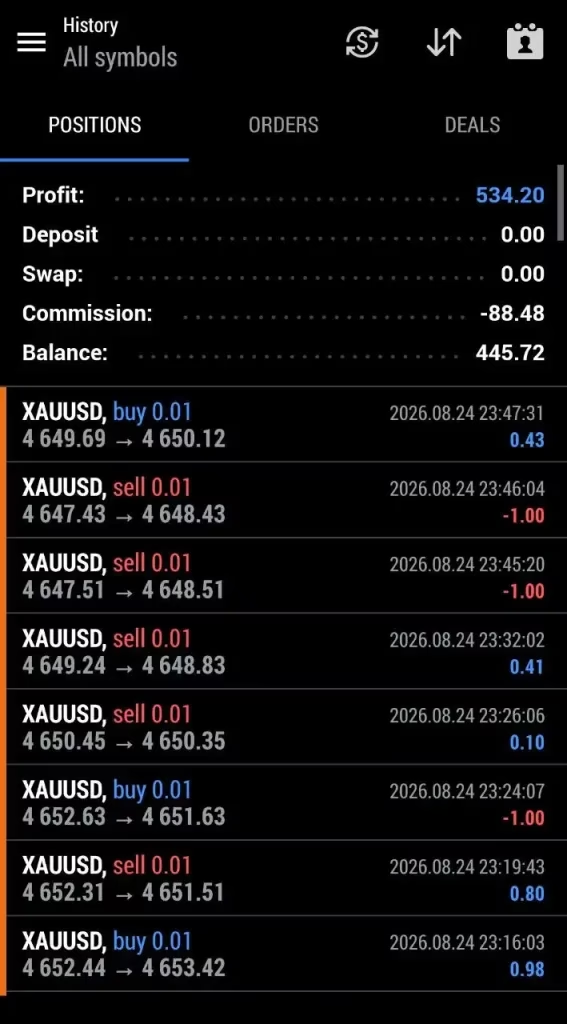
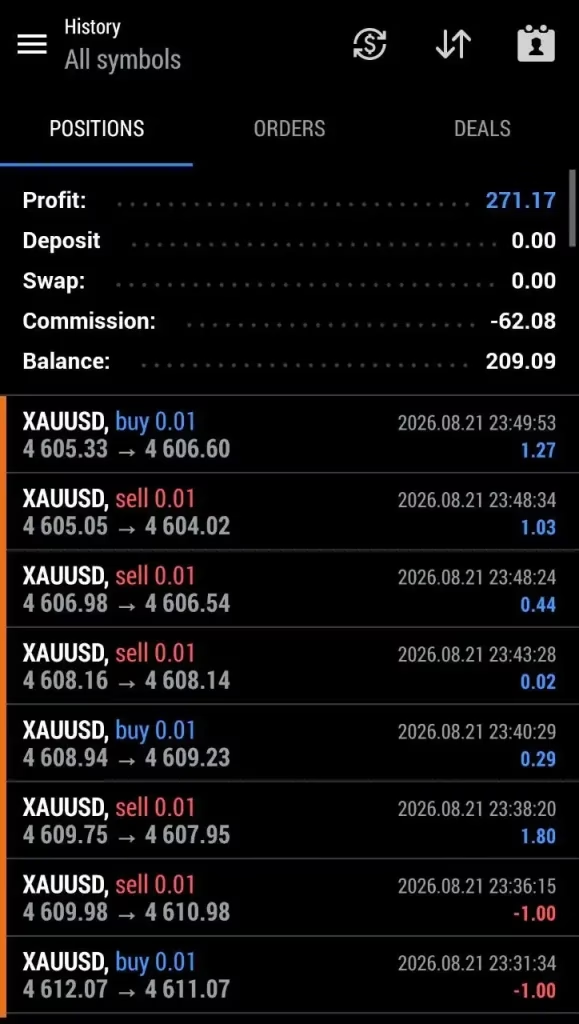
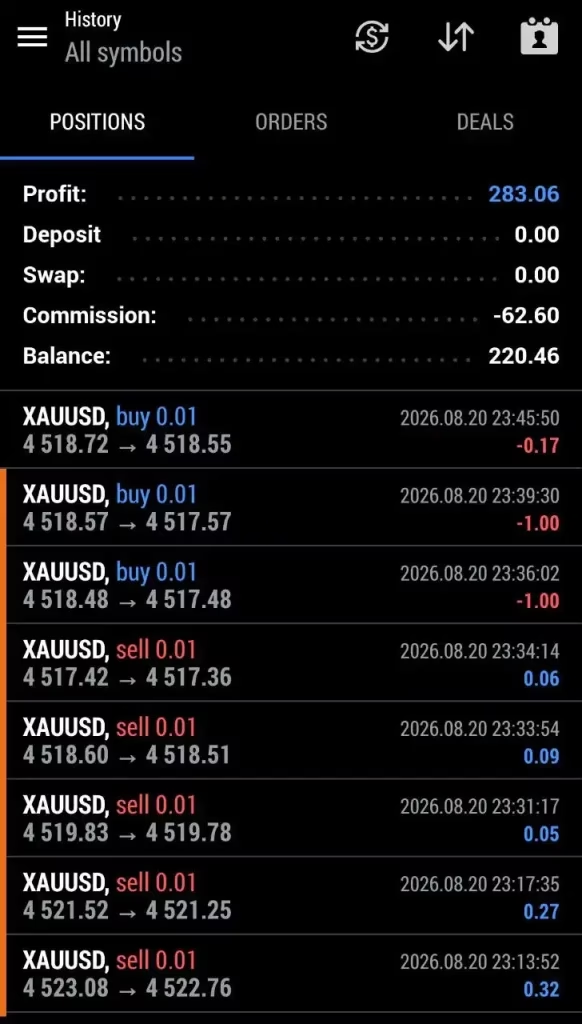
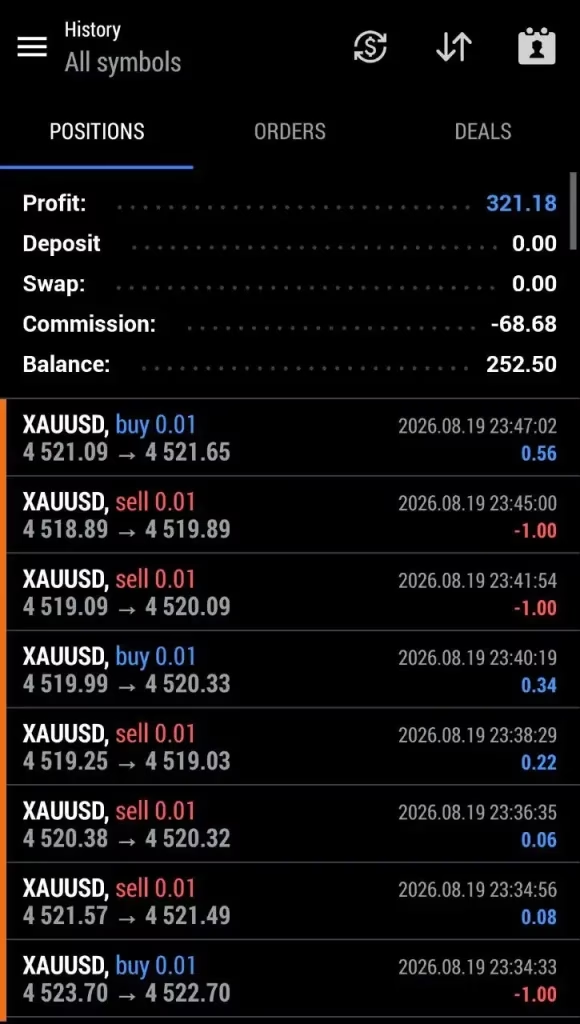
PipScalper EA MT5 is an automated XAUUSD Gold scalping Expert Advisor for MetaTrader 5. It uses M1 breakout trading with Buy Stop and Sell Stop orders, a fixed Stop Loss, and trailing-stop management for systematic short-term Gold trading.
415788PipScalperEA@1FusionMarkets-Demo25922723PipScalperEA@1VantageMarkets-Demo
Description
PipScalper EA MT5 – Automated XAUUSD Gold Scalping Expert Advisor
PipScalper EA MT5 – Automated Gold Scalping Made Simple
PipScalper EA MT5 is a specialized Expert Advisor for automated XAUUSD Gold trading on MetaTrader 5. It is designed around a mechanical breakout approach that waits for Gold to move through predefined price levels before activating a trade.
Instead of manually monitoring every short-term price movement, the EA can automatically place pending orders and manage activated positions according to its programmed trading logic.
The strategy focuses on three core elements:
- Breakout-based entries
- Predefined Stop Loss
- Dynamic trailing-stop management
This creates a structured framework for automated short-term Gold trading.
Automated XAUUSD Breakout Trading
Gold is well known for its fast price movements and periods of elevated intraday volatility. PipScalper EA MT5 is designed specifically around these short-term movements.
The EA uses pending orders on both sides of the current XAUUSD price:
- Buy Stop above the current market price
- Sell Stop below the current market price
The stated configuration uses a 100-pip entry distance, corresponding to approximately $1 of Gold price movement under the specified setup.
The basic trading concept is:
Buy Stop + Sell Stop → Breakout → Automated Entry → Stop Loss → Trailing Stop
This allows the market to determine the initial direction rather than requiring the trader to predict whether Gold will rise or fall.
How PipScalper EA MT5 Works
The trading process follows a simple mechanical structure.
1. Monitor XAUUSD
The EA monitors the Gold market on the M1 timeframe, focusing on short-term price movements.
2. Establish Breakout Levels
Pending Buy Stop and Sell Stop orders are positioned according to the configured entry distance.
3. Wait for Price Movement
The EA remains ready until XAUUSD reaches one of the predefined breakout levels.
4. Activate the Trade
If Gold moves upward and reaches the Buy Stop, the buy position can be activated.
If Gold moves downward and reaches the Sell Stop, the sell position can be activated.
5. Apply Stop Loss
The activated trade receives the predefined Stop Loss according to the strategy settings.
6. Manage the Position
When the trade moves favorably, the trailing-stop mechanism can adjust the protective exit level.
7. Close and Continue
After the position reaches its exit condition, the EA can continue monitoring the market for another potential breakout opportunity.
M1 Gold Scalping Strategy
PipScalper EA MT5 is designed to operate on the M1, or 1-minute, timeframe.
The M1 timeframe provides a detailed view of short-term Gold price movements and is commonly used for scalping strategies.
Because the strategy operates on short timeframes, execution conditions are especially important.
Traders should pay close attention to:
- Spread
- Slippage
- Commission
- Execution speed
- Liquidity
- Broker conditions
- VPS latency
- Market volatility
A strategy that performs well in historical testing may behave differently in live trading because real execution conditions can vary.
100-Pip Breakout Entry
The stated PipScalper configuration uses a 100-pip entry distance.
Under the specified XAUUSD setup, this corresponds to approximately $1 in Gold price movement.
The purpose of this distance is to allow the EA to wait for a meaningful price movement before activating a position.
For example:
Current XAUUSD Price → 100-Pip Upper Level → Buy Stop
and
Current XAUUSD Price → 100-Pip Lower Level → Sell Stop
The exact pip-to-price conversion can vary depending on the broker’s XAUUSD quotation and contract specifications, so traders should verify the values directly in MetaTrader 5.
Fixed 100-Pip Stop Loss
PipScalper EA MT5 uses a stated 100-pip Stop Loss configuration.
A predefined Stop Loss provides a mechanical exit level if the market moves against an activated position.
The main benefits include:
- Defined trade risk
- Consistent exit rules
- Reduced manual intervention
- Structured position management
- Protection against unlimited downside on an individual trade
However, a Stop Loss does not guarantee execution at the exact requested price. Slippage, gaps, liquidity, and broker execution can affect the actual result.
20-Pip Trailing Stop
In addition to the fixed Stop Loss, PipScalper EA MT5 uses a stated 20-pip trailing stop.
The trailing mechanism is designed to follow a position as the market moves favorably.
This can help the system:
- Protect accumulated gains
- Follow short-term momentum
- Adjust the protective exit automatically
- Reduce exposure when momentum reverses
- Avoid relying entirely on a fixed profit target
Under the specified Gold configuration, 20 pips correspond to approximately $0.20 of price movement.
Key Features of PipScalper EA MT5
Automated XAUUSD Trading
Designed specifically for automated Gold trading on MetaTrader 5.
M1 Scalping
Built around short-term trading on the 1-minute XAUUSD chart.
Breakout Entries
Uses pending Buy Stop and Sell Stop orders to respond to predefined price movements.
100-Pip Entry Distance
The stated strategy uses a 100-pip distance for breakout entries.
100-Pip Stop Loss
Provides a predefined protective exit according to the strategy configuration.
20-Pip Trailing Stop
Automatically manages the protective level as a trade moves favorably.
Automated Execution
Once configured correctly, the EA can execute its programmed trading logic without requiring manual order placement.
Gold-Focused Strategy
The system is specifically designed around XAUUSD rather than a broad range of currency pairs.
VPS-Friendly Operation
A reliable VPS is recommended for continuous automated trading.
Recommended PipScalper EA MT5 Setup
| Setting | Recommended Configuration |
|---|---|
| Expert Advisor | PipScalper EA MT5 |
| Platform | MetaTrader 5 |
| Symbol | XAUUSD / Gold |
| Timeframe | M1 |
| Trading Style | Scalping |
| Entry Method | Buy Stop / Sell Stop |
| Entry Distance | 100 pips |
| Stop Loss | 100 pips |
| Trailing Stop | 20 pips |
| Account Type | ECN Raw Spread Preferred |
| VPS | Recommended |
| Main Instrument | XAUUSD |
The exact pip-to-price conversion may differ between brokers, so always verify the symbol specifications inside your MT5 terminal.
ECN Raw Spread Account Recommended
The product configuration recommends an ECN Raw Spread account rather than a Standard account.
This is particularly relevant to scalping because frequent entries and exits can make trading costs an important part of overall performance.
Before using the EA, check:
- XAUUSD availability
- Spread
- Commission
- Minimum lot size
- Stop-level requirements
- Execution speed
- Leverage
- Margin requirements
- Trading sessions
Competitive trading costs can help reduce unnecessary transaction expenses, but they cannot eliminate market risk.
VPS Recommended for Automated Trading
A reliable Virtual Private Server (VPS) is recommended for PipScalper EA MT5.
A VPS can help keep MetaTrader 5 running when your personal computer is:
- Turned off
- Restarted
- Disconnected from the Internet
- Affected by power interruptions
- Experiencing technical problems
For short-term automated trading, maintaining a stable connection can be particularly useful.
A VPS located close to the broker’s infrastructure may also help reduce network latency.
However, a VPS does not guarantee better execution or profitability.
Why Choose PipScalper EA MT5?
PipScalper EA MT5 is designed for traders who prefer a mechanical XAUUSD breakout strategy instead of manually entering every short-term Gold trade.
Main Benefits
- Automated XAUUSD trading
- MetaTrader 5 compatibility
- M1 Gold scalping
- Breakout-based entries
- Pending-order execution
- Fixed Stop Loss
- Trailing-stop management
- Systematic trade execution
- Reduced manual monitoring
- VPS-compatible operation
- Gold-focused trading approach
The strategy’s straightforward structure also makes it easier to understand and evaluate during testing.
PipScalper EA MT5 Trading Process
The complete trading cycle can be summarized as follows:
Step 1: Monitor XAUUSD on M1
Step 2: Establish predefined breakout levels
Step 3: Place Buy Stop and Sell Stop orders
Step 4: Wait for price to reach a breakout level
Step 5: Activate the corresponding position
Step 6: Apply the predefined Stop Loss
Step 7: Manage the position with the trailing stop
Step 8: Close the trade according to the exit conditions
Step 9: Continue monitoring for another opportunity
This creates a repeatable automated trading workflow.
Who Is PipScalper EA MT5 For?
PipScalper EA MT5 may be suitable for:
- XAUUSD Gold traders
- MetaTrader 5 users
- Forex traders interested in automation
- Gold scalping enthusiasts
- Algorithmic trading users
- Traders interested in breakout strategies
- Traders who prefer pending-order execution
- Users who want to reduce manual chart monitoring
- Traders looking for an M1 Gold Expert Advisor
- Users operating automated strategies through a VPS
Beginners should first test the EA on a demo account and become familiar with its behavior before considering live trading.
Easy PipScalper EA MT5 Setup
Getting started is straightforward:
- Install MetaTrader 5.
- Make sure your broker supports XAUUSD.
- Install PipScalper EA MT5.
- Open an XAUUSD chart.
- Select the M1 timeframe.
- Attach the EA to the chart.
- Review all available parameters.
- Check the entry, Stop Loss, and trailing-stop settings.
- Enable automated trading.
- Run the EA on a demo account for testing.
For more automated trading solutions, explore our Expert Advisor collection.
Testing Before Live Trading
Thorough testing is strongly recommended before using real funds.
During testing, evaluate:
- Entry frequency
- Maximum drawdown
- Spread costs
- Commission
- Slippage
- Stop Loss behavior
- Trailing-stop behavior
- Trading frequency during volatile periods
- Execution speed
- VPS stability
- Account exposure
- Performance across different market conditions
Forward testing under your intended broker can provide useful information about real-world execution.
Expand Your Automated Trading Toolkit
If you are interested in building a broader automated trading environment, you can explore our:
- Expert Advisor collection for automated trading systems
- Indicator collection for technical-analysis tools
- Source Code collection for MT4 and MT5 development projects
These resources can help you build a more complete algorithmic trading toolkit.
Instant Digital Access After Payment
After completing your purchase, you can access your purchased product files through your account.
Visit Download Immediately After Payment to access your available downloads.
This allows you to quickly receive PipScalper EA MT5 and begin the installation and testing process.
Important Risk Disclaimer
Forex, Gold, CFDs, and other leveraged financial instruments involve substantial financial risk.
PipScalper EA MT5 does not guarantee profits or eliminate trading risk.
Automated Gold scalping can be particularly sensitive to:
- Market volatility
- Spread expansion
- Commission
- Slippage
- Liquidity
- Broker execution
- Leverage
- Position sizing
- Technical interruptions
- VPS performance
A Stop Loss does not guarantee the exact execution price, and a VPS does not guarantee improved profitability.
Backtest, simulated, or historical results are not guarantees of future performance.
Always test PipScalper EA MT5 under your own broker conditions, use appropriate position sizing, and never trade with money you cannot afford to lose.
Get PipScalper EA MT5 Today
If you are looking for an automated XAUUSD Gold scalping EA for MetaTrader 5, PipScalper EA MT5 offers a focused breakout framework using pending orders, a predefined Stop Loss, and trailing-stop management.
With its M1 Gold scalping strategy, 100-pip breakout distance, 100-pip Stop Loss, and 20-pip trailing stop, PipScalper EA MT5 provides a structured solution for traders interested in automated short-term XAUUSD trading.
Stay updated with new Expert Advisors, Indicators, and trading products through our Official Trading Channel.
For product, installation, or purchase assistance, contact our Customer Support.

Related products

Expert Advisor

Expert Advisor

Expert Advisor

Expert Advisor

Expert Advisor

Expert Advisor

Expert Advisor

Expert Advisor